Note: The Cascade Segmentation step is enabled by license. Please ensure you request the module is enabled on first use.
A cascade segmentation allows you to add waterfall style campaign audiences to an Engage campaign. Cascade audiences are filtered into individual communication outputs based on inclusion and exclusion query criteria. To add a cascade step to a campaign, you must first build a cascade segmentation.
-
Click on the create (+) icon in the navigation pane to open the create window and select the cascade segmentation element.
-
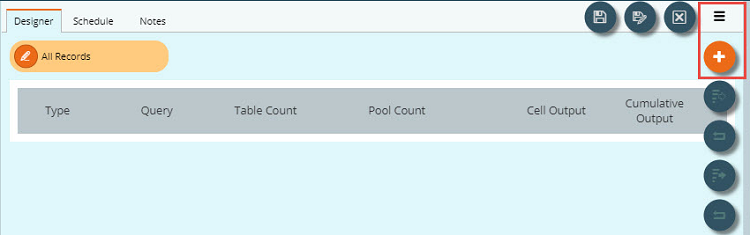
Add segments (cells) using the add (+) icon on the hamburger menu.
-
Select a cell and use the dropdown in the properties pane to define a type for each cell.
-
Exclude - this will exclude all records meeting the criteria defined in the cell from within the incoming audience of records
-
Include - this will retain all records meeting the criteria defined in the cell from within the incoming audience
-
Output - this will export all records meeting the criteria defined in the cell from all of the records left after deduplication against the previous cells
-
-
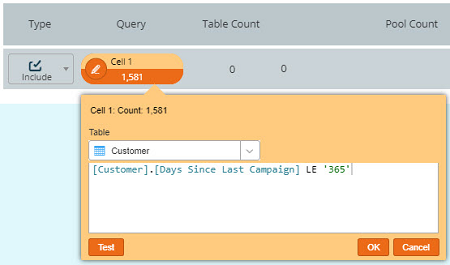
Add a query to each cell. An optional domain query may be added at the top to start the segmentation if needed.
-
If required, add a restriction to the output, e.g. to match the output sample size to an available amount of printed material. Selected records will continue through the segmentation. The cell display also contains an additional Restricted Output column to easily identify restricted cells and the number of items removed.
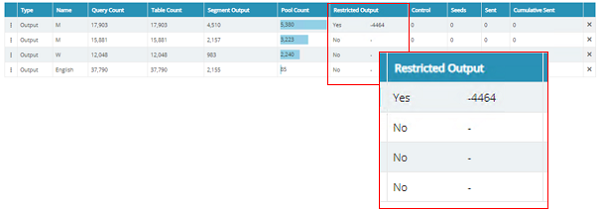
To copy restriction settings across cells, right click on a restricted output cell and select one of the available options.
-
Once all cells have been added, in the relevant order (the segmentation deduplicates from the top-down), open the hamburger menu and save your segmentation.
-
Use the trial run icon (available from the hamburger menu) to test the cascade and allow counts to appear.
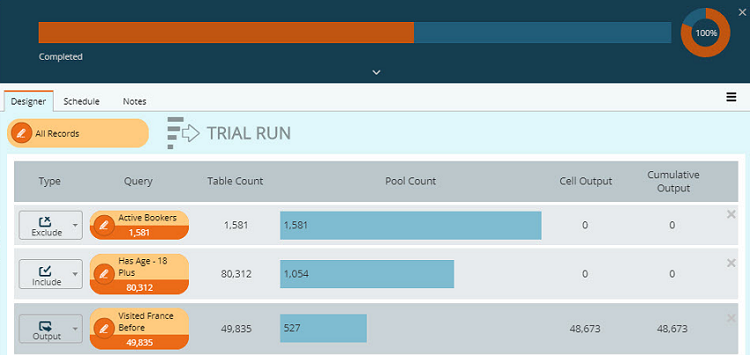
Note: It is possible to have multiple cells of each type within a single cascade segmentation.